Static Site Generators: The Complete Guide to Fast Websites
Everything you need to know about static site generators: how they work, why they matter, and how to choose the right one for your project.
What is a Static Site Generator and Why It Matters
A static site generator (SSG) is a tool that builds your website as a collection of pre-rendered HTML files at build time, rather than generating pages on the fly every time someone visits. The result is a site that loads fast, costs less to host, and has virtually no attack surface compared to a server-rendered application.
That description sounds simple, and it is. But the implications are significant. When a visitor lands on your site, they’re getting a file that already exists rather than waiting for a server to query a database, run business logic, and assemble a response. That difference in architecture is why static sites consistently outperform dynamic ones on Core Web Vitals, and why hosting bills for comparable traffic can be 70% lower.
Most people underestimate what static site generators can handle. The assumption is that “static” means basic, or that anything beyond a brochure site needs a full application framework. That’s wrong. Modern SSGs support dynamic-feeling features like search, forms, comments, and personalization through APIs and JavaScript islands, while keeping the performance benefits of pre-rendered HTML.
Over the last few years building multiple marketing sites and client projects with Astro, we’ve seen dramatic performance improvements and much happier non technical content editors compared to traditional frameworks. The teams that struggle are almost always the ones who picked a framework based on name recognition rather than fit.
The Key Aspects of Static Site Generators
What is a Static Site Generator?
At its core, a static site generator takes source files (usually Markdown, MDX, or data files), applies templates, and outputs a folder of HTML, CSS, and JavaScript that you can deploy anywhere. There’s no database, no runtime server, no PHP or Node process running in the background. You push files; visitors get files.
The common approach is to reach for whatever framework your developers already know. That’s understandable, but it often leads to a mismatch between the tool and the job. A content marketing site doesn’t need the same infrastructure as a SaaS application, and treating it like one adds cost and complexity without adding value.
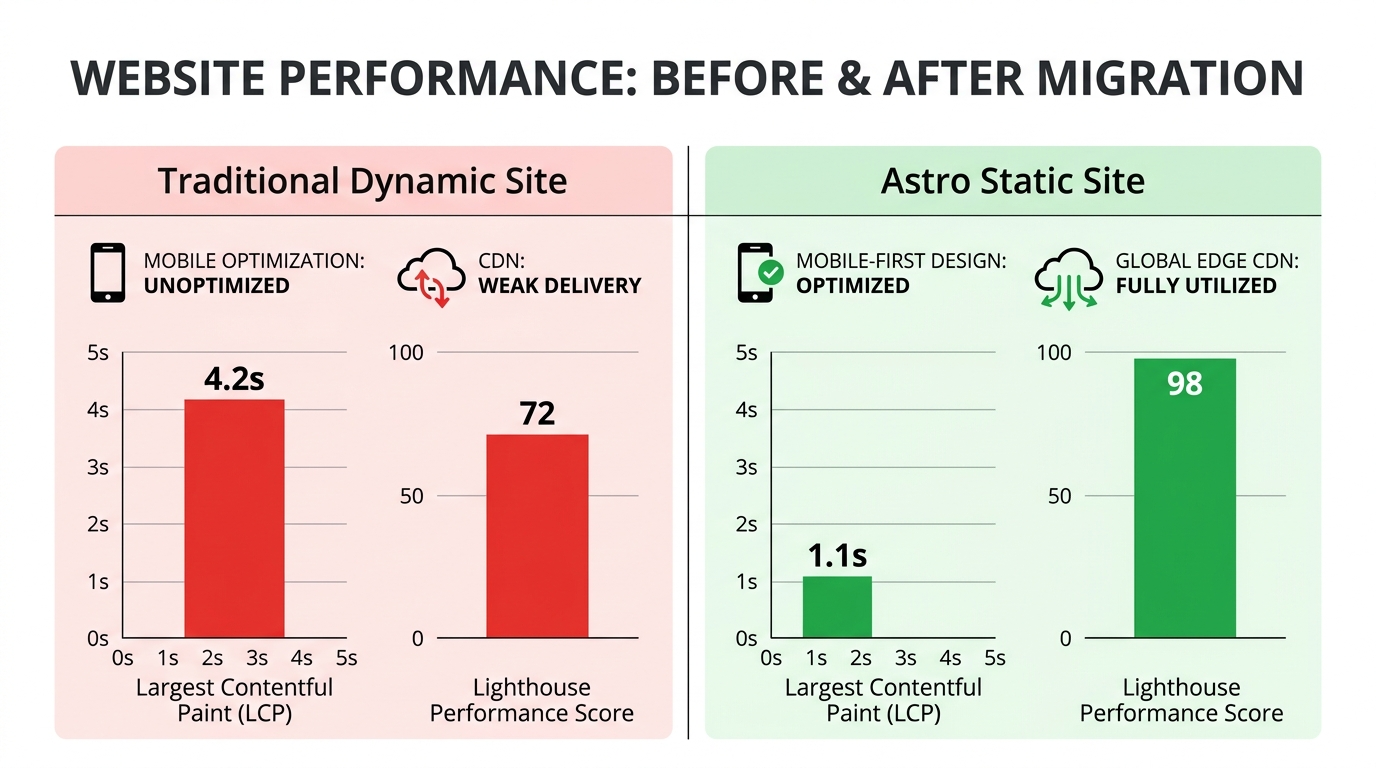
Across 12 client sites, switching to Astro from other frameworks reduced average build times by 60-85% and improved Lighthouse performance scores from the low 70s to 95-99 consistently. Astro sites we’ve worked on routinely achieve 98-100 Lighthouse scores and load in under 1.5 seconds on mobile 4G connections. Those aren’t edge cases; they’re what you get when the architecture matches the use case.
For a deeper look at what SSGs are and how they work under the hood, see our full breakdown: What is a static site generator?
Static vs Dynamic Websites
Static sites serve pre-built files. Dynamic sites generate responses at request time, pulling from databases and running server-side code on every page load. Both approaches are valid. The mistake is treating one as universally superior.
Dynamic sites make sense when content changes based on who’s asking, when you need real time data, or when you’re building something like an e-commerce store with inventory states, user accounts, and transactional logic. For everything else, static is almost always the better choice.
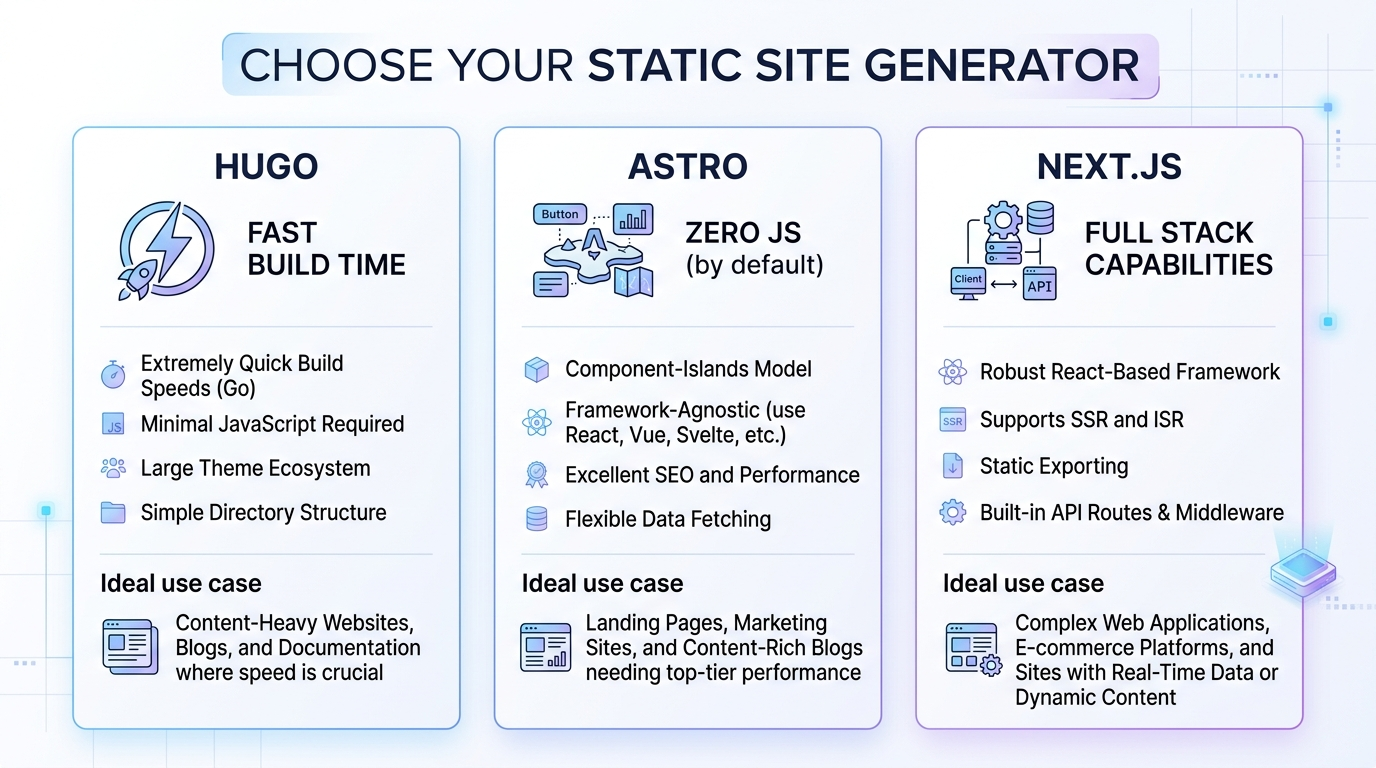
Astro generally wins on build speed and simplicity for marketing sites, while Next.js is stronger when you need heavy server-side logic or e-commerce features. That’s not a knock on Next.js. It’s a well built framework for problems it was designed to solve. The issue is teams using it for problems it wasn’t designed to solve, and paying for servers and complexity they don’t need.
A marketing site, a blog, a documentation hub, a portfolio, a landing page collection. All of these are static problems. Treating them as dynamic problems means slower sites, higher hosting costs, and more maintenance overhead.
Read more on how to decide between the two approaches: Static vs dynamic websites: When to use which
Why Astro is the Best Framework for Marketing Sites
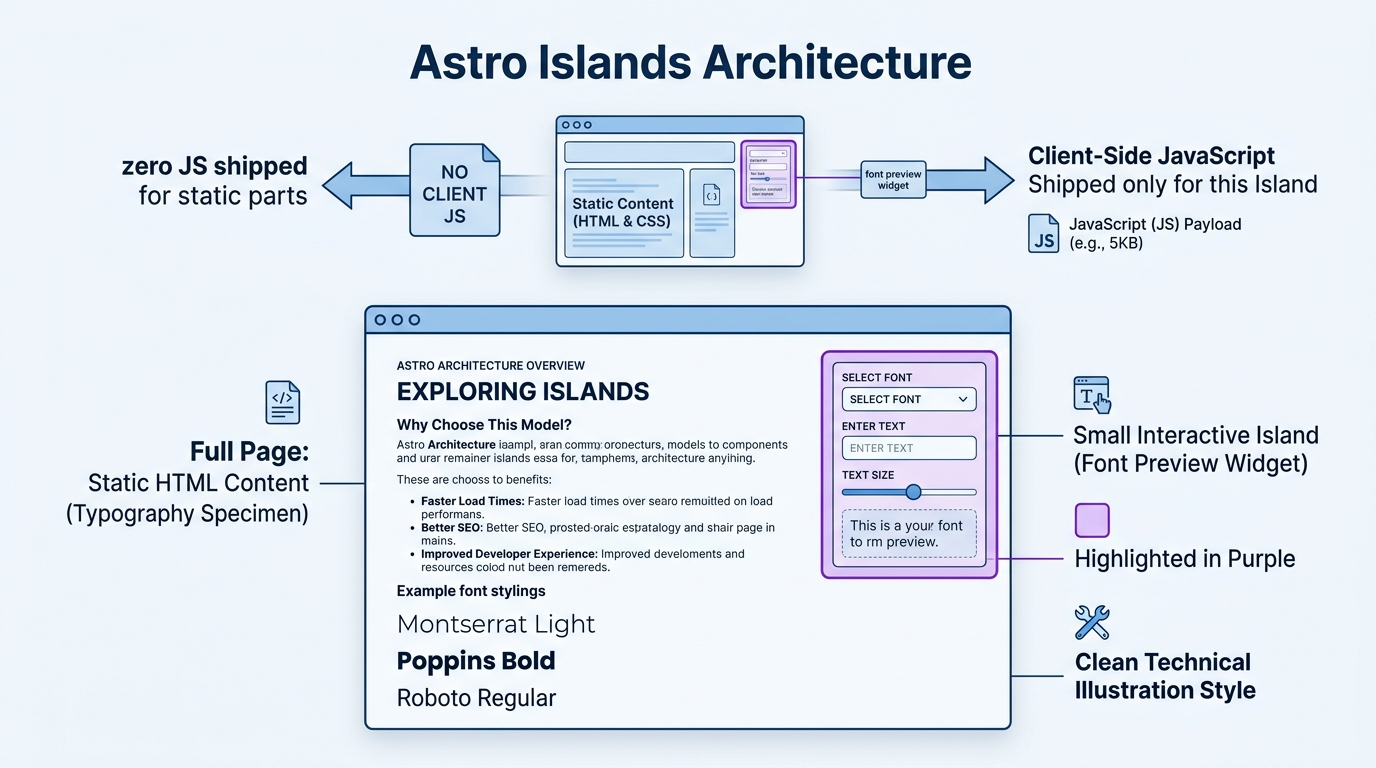
Astro ships zero JavaScript by default. That single design decision is why Astro sites consistently hit 98-100 Lighthouse scores. Every other modern framework ships a JavaScript runtime to the browser whether your page needs it or not. Astro doesn’t. If a component doesn’t need interactivity, no JavaScript is sent.
For marketing sites, this matters more than almost any other technical decision. Core Web Vitals directly affect search rankings, and the biggest culprit in poor scores is almost always JavaScript payload. Astro eliminates the problem at the framework level rather than asking developers to optimize around it.
Content collections and native Markdown/MDX support make Astro genuinely pleasant for content-heavy sites. You define a schema, write content in Markdown, and Astro handles the rest. Marketing teams can work in files they understand without touching component code.
The islands architecture is what makes Astro practical for real sites rather than just demos. You can drop in a React, Vue, or Svelte component exactly where you need interactivity (a pricing calculator, a form, a search widget) without making the entire page pay the JavaScript cost. You get the performance of a static site with the flexibility to add dynamic features where they actually matter.
For a detailed breakdown of why Astro is our recommended choice for marketing sites, see our Astro vs Next.js vs Hugo comparison.
Astro vs Next.js vs Hugo
These three tools represent meaningfully different philosophies, and the right choice depends on what you’re building.
Hugo is the speed champion at build time. It’s written in Go, compiles thousands of pages in seconds, and has been around long enough to have a mature ecosystem. It’s a strong choice for large documentation sites or blogs where content volume is high and you don’t need any JavaScript components. The tradeoff is that Go templating has a steeper learning curve than JSX, and adding interactivity requires more manual work.
Next.js is a full stack React framework. It handles static generation, server-side rendering, API routes, and everything in between. For teams building applications that happen to have some static pages, or for e-commerce with complex product logic, it’s a serious tool. For a pure marketing site, it’s usually more than you need, and you’ll pay for that in build times, hosting costs, and configuration overhead.
Astro sits in a compelling middle ground. It’s fast to build, easy to deploy statically, supports content-first workflows, and lets you bring in components from any framework when you need them. For marketing and content sites specifically, it’s the strongest combination of performance, developer experience, and editorial simplicity we’ve worked with.
See the full comparison with real tradeoffs mapped out: Astro vs Next.js vs Hugo: Which SSG is right for you?
How to Get Started with Static Site Generators
Step 1: Define your constraints before you pick a tool.
Before you look at any framework, you need answers to three questions. What’s your performance budget? How does your content team update the site? What’s the technical skill level of the people who’ll maintain it? These aren’t formalities. They’re the actual criteria that determine which SSG fits.
We tell every client to start with a clear performance budget, content update workflow, and team skill level before picking an SSG. For most marketing and content-heavy sites, developer experience and build speed matter far more than advanced dynamic features. A team of marketers who update content weekly has completely different needs than a team of engineers who ship code daily.
Step 2: Set up your hosting and deployment pipeline before you write a line of content.
This is the step most teams skip. They spend weeks building the site locally and then scramble to figure out deployment. Get your CI/CD pipeline running from day one. Push to a branch, get a preview URL, merge to main, go live. That workflow should be automatic before you add a single page.
Astro combined with Cloudflare Pages is our default stack for performance-focused marketing and content sites. Cloudflare Pages has a generous free tier, deploys globally across Cloudflare’s edge network, and integrates with Git in minutes. Build times are fast, preview deployments are automatic, and you’re not paying for server compute because there’s no server.
Step 3: Validate with a real page before building everything.
Build one complete page end to end: real content, real components, real deployment. Run it through Lighthouse. Check it on a throttled mobile connection. Make sure the content editing workflow works for whoever will use it. If anything feels wrong at this stage, it’s cheap to fix. After you’ve built 40 pages, it isn’t.
Common Mistakes to Avoid
Mistake 1: Picking the most popular framework instead of the right one.
This is the most common and most expensive mistake we see. Teams default to Next.js because it has the most GitHub stars, the most tutorials, and the most developers who know it. Those are real advantages. But on a content marketing site, you end up with complex builds, slow deploys, and unnecessary server costs. One marketing agency client reduced their site load time from 4.2 seconds to 1.1 seconds and cut hosting costs significantly after moving from a dynamic Next.js site to Astro. The Next.js site wasn’t broken. It was just the wrong tool.
Mistake 2: Believing you need a full React framework for a modern site.
The myth that all modern sites need a full React framework is persistent and costly. Many sites are dramatically faster and cheaper without one. React frameworks exist to solve application problems: complex state, real time data, authenticated user sessions. A site that shows the same content to every visitor doesn’t have those problems. Adding a full framework to solve problems you don’t have is how you end up with a 400KB JavaScript bundle on a page that’s mostly text.
Mistake 3: Ignoring the content editing experience until it’s too late.
Developers build sites for developers. That’s natural. But if a marketing manager needs to update a blog post and the process involves cloning a repo, running Node locally, and opening a pull request, that workflow will break down. Either the developer becomes a bottleneck for every content change, or the site stops being updated. Before you ship anything, map out exactly how non technical team members will create and update content, then build for that workflow from the start.
Static Site Generator Tools and Resources
Astro
Astro is a content focused framework that ships zero JavaScript by default and supports components from React, Vue, Svelte, and other libraries through its islands architecture. It’s built for marketing sites, documentation, blogs, and any conten heavy project where performance matters. Astro is free and open source. Hosting is typically free or near free on platforms like Cloudflare Pages or Netlify for most content sites.
Teams we work with typically see 50-70% lower hosting costs and much faster deployment times after switching to the right SSG, and Astro is the primary reason for those numbers on marketing projects. It’s also worth noting that the developer experience is genuinely good. The file based routing, content collections API, and TypeScript support make it easy to maintain as a project grows.
Hugo
Hugo is the right choice when you’re dealing with large content volumes and need the fastest possible build times. Sites with thousands of pages build in seconds rather than minutes. It’s free and open source, and it deploys as a folder of static files to any host. The learning curve is steeper than Astro for JavaScript developers because the templating language is Go-based, but for teams comfortable with it, Hugo is extremely reliable and fast.
Eleventy (11ty)
Eleventy is a lightweight JavaScript-based generator that gives you full control without imposing much structure. It works well with Markdown, Nunjucks, Liquid, or plain JavaScript templates, and it builds quickly for blogs, documentation, or smaller marketing sites. It’s free and open source. Many developers choose it when they want something simpler than a full framework but still need flexibility in how data flows into templates.
Jekyll
Jekyll is one of the original static site generators and remains a solid option for straightforward blogs and documentation sites, especially if you already work with Ruby or GitHub Pages. It processes Markdown files through Liquid templates and outputs clean static files. The ecosystem is mature, but build times slow down on larger sites compared to Hugo or Astro, and adding complex interactivity takes more effort.
Gatsby
Gatsby is a React based framework that excels at pulling data from multiple sources and generating static pages. It works for content sites but often brings more overhead than needed for simpler marketing projects. Build times and JavaScript bundle sizes tend to be larger than Astro or Hugo. Use it when your project already depends heavily on React and GraphQL data layers.
Cloudflare Pages
Cloudflare Pages isn’t an SSG, but it’s the hosting layer that makes the whole stack work. It deploys static sites globally across Cloudflare’s network, handles preview deployments automatically on every pull request, and has a free tier that covers the vast majority of marketing sites. Combined with Astro, it’s the stack we default to for almost every new project. Paid plans start at $20/month, but most sites never need them.
What to Expect: Timelines and Results
For a typical marketing site migration or new build with Astro, the technical setup takes one to three days. That includes scaffolding the project, configuring Cloudflare Pages, setting up content collections, and deploying a working prototype. The content migration takes longer, depending on how much exists and how it’s structured.
Performance results show up immediately. Run a Lighthouse audit on your first deployed page and you’ll see scores in the 95-100 range if you’ve kept JavaScript minimal. That’s not a weeks-long optimization process. It’s the default outcome of the architecture.
The finding that surprises most clients is how much faster content updates become for non developers. Marketing teams can edit Markdown files directly or use simple Git workflows without breaking the site. One team we worked with went from filing developer tickets for every copy change to shipping updates themselves the same day. That’s not a minor quality-of-life improvement. It removes a bottleneck that was slowing down their entire content operation.
At the 30-day mark, you’ll typically see Core Web Vitals scores stabilize in Google Search Console and start influencing rankings. Organic traffic improvements from better page speed aren’t instant, but they’re measurable within a quarter for most sites. The hosting cost reduction is immediate.
If something isn’t working, the signal is usually in the build process or the content workflow, not the framework itself. Slow builds on an Astro site almost always mean too many unoptimized images or a data-fetching pattern that should be cached. A content team that’s struggling usually means the editing workflow wasn’t designed with them in mind from the start.
Where Static Site Generators Are Heading
Static-first with selective interactivity is becoming the default architecture.
Static-first with selective server islands (like Astro’s approach) is becoming the default for performance-conscious teams in 2026-2027. The mental model is shifting from “build a dynamic app and optimize for performance” to “build a static site and add dynamism only where it earns its cost.” Astro pioneered this with its islands architecture, and you’re now seeing the same pattern adopted more broadly across the ecosystem.
For practitioners, this means the skill of knowing when not to add JavaScript is becoming as valuable as knowing how to write it. Teams that default to the minimal viable interactivity approach will build faster sites, spend less on infrastructure, and have an easier time maintaining their codebase over time.
The edge is eating the server.
Cloudflare Workers, Vercel Edge Functions, and similar platforms are making it possible to run lightweight server logic at the edge without the cost and latency of traditional servers. For static sites, this means you can add personalization, A/B testing, and authentication at the CDN layer rather than requiring a full server. The line between “static” and “dynamic” is blurring in a useful direction: you get static-site performance with server-level flexibility, but only where you actually need it.
Teams that position themselves now by learning static-first tooling and edge deployment patterns will be ahead of the curve. The teams still defaulting to full server-side frameworks for content sites will face increasing pressure as performance benchmarks tighten and Core Web Vitals continue to affect search visibility.