What is a static site generator?
Everything you need to know about static site generators: how they work, why they matter, and how to choose the right one for your project.
What Performance Benefits Do Static Site Generators Offer and Why It Matters
Static site generators produce complete HTML files at build time. When a visitor requests a page, the server (or CDN) delivers a finished document — no database queries, no on-the-fly assembly, no blank shell waiting for JavaScript to hydrate.
This approach delivers fast Time to First Byte, predictable performance under load, and minimal client-side JavaScript by default. Combined with CDN edge delivery, pages load quickly regardless of where your users are located.
Performance is the main reason most teams adopt static site generators, yet many only capture part of the benefit. They get the static files right, then undermine the gains by shipping heavy JavaScript bundles or ignoring image/font optimization. The real wins come from treating performance as an architectural decision, not just a hosting choice.
For the fundamentals, see the static site generators overview. This piece focuses specifically on performance outcomes and how to achieve them.
I’ve architected and launched over a dozen production static sites for clients in the creative and design industries. The consistent pattern: many features that first appear to require dynamic server rendering turn out to work better with static generation plus targeted interactive islands. The highest-performing sites come from teams that constantly ask whether something truly needs to run in the browser.
Core Concept: Build-Time Rendering Explained
Build-time rendering means the generator walks every route, assembles data from files, APIs, or a CMS, and outputs ready-to-serve HTML before any user arrives. The web server’s job is reduced to serving static files.
In practice this creates important realities:
- Content freshness matches your build/deploy cadence (fine for most marketing, documentation, and portfolio sites).
- Build performance matters — large sites need good incremental build support.
- The browser receives complete, predictable HTML, enabling immediate parsing and rendering instead of waiting for JavaScript execution.
The advantage is especially noticeable on lower-end devices and slower connections. Pre-rendered HTML can be displayed orders of magnitude faster than waiting for a client-side app to boot.
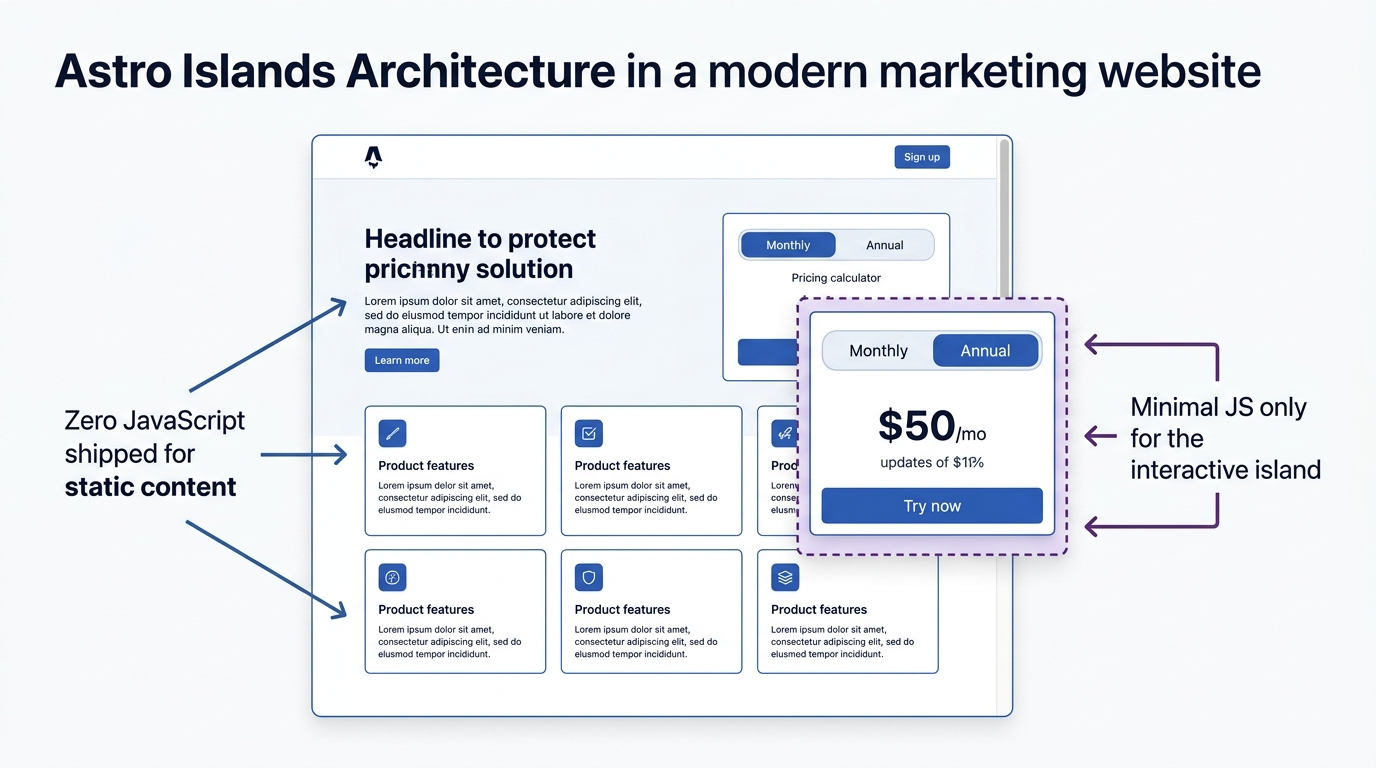
The real power of static site generators in 2026 isn’t zero JavaScript — it’s the ability to ship near-zero JavaScript for most users while still supporting rich interactions exactly where needed. A blog post can stay completely static while a single comment widget or add-to-cart button loads its own small script. This selective model is what separates truly fast sites from those that are only statically generated in name.
Implementation: Building for Speed
-
Measure first. After a build, test with real throttling (slow 4G) in Chrome DevTools or WebPageTest. Focus on Time to First Byte, Largest Contentful Paint, and Total Blocking Time.
-
Audit JavaScript. Check what actually ships. Content pages should ideally load little to no JS. Heavy framework bundles on mostly static pages are the fastest way to lose the benefits of going static.
-
Configure caching and assets correctly. Use long cache headers for versioned assets (CSS/JS/images with hashes) and sensible short-to-medium headers for HTML. Most generators handle asset fingerprinting well — make sure your CDN respects it.
The most common mistake is adding unnecessary client-side JavaScript for things that could be handled at build time or with simple progressive enhancement. Always ask: does this need to run in the browser, or am I defaulting to familiar tools?
Advanced Techniques
Once the basics are solid, the next level comes from islands architecture, partial hydration, and edge revalidation.
- Islands isolate interactive components so the rest of the page stays pure static HTML.
- Partial hydration controls when those islands activate (on scroll, on interaction, etc.).
- Edge revalidation lets you serve cached static HTML with background updates for semi-fresh content without full rebuilds.
Here’s a real-world example of how islands work in practice. On a font foundry site, visitors need to preview typefaces with custom text and weight selection. Instead of shipping a full React app on every page, only the preview widget hydrates — the surrounding specimen page, documentation, and blog posts stay pure HTML:
---
// src/pages/fonts/[slug].astro
import FontPreview from '../../components/FontPreview.tsx';
import Layout from '../../layouts/Layout.astro';

const { font } = Astro.props;
---

<Layout>
  <!-- This entire section ships ZERO JavaScript -->
  <h1>{font.family}</h1>
  <p>Designed by {font.designer} — {font.styles.length} styles available.</p>

  <!-- Only this island hydrates — ~8KB of JS instead of ~140KB -->
  <FontPreview client:visible fontUrl={font.woff2Url} weights={font.weights} />
</Layout>
// src/components/FontPreview.tsx — ~8KB hydrated JS
import { useState } from 'react';
interface Props {
fontUrl: string;
weights: number[];
}
export default function FontPreview({ fontUrl, weights }: Props) {
const [text, setText] = useState('The quick brown fox');
const [weight, setWeight] = useState(weights[0]);
return (
<div className="rounded-xl border border-neutral-200 p-6">
<input
type="text"
value={text}
onChange={(e) => setText(e.target.value)}
className="mb-4 w-full rounded-lg border px-3 py-2"
/>
<p style={{ fontFamily: 'custom', fontSize: '3rem', fontWeight: weight }}>
{text}
</p>
<div className="mt-4 flex gap-2">
{weights.map((w) => (
<button
key={w}
onClick={() => setWeight(w)}
className="rounded-full px-3 py-1 text-sm"
>
{w}
</button>
))}
</div>
</div>
);
}The result: a fully interactive font tester that loads as an isolated island, while the editorial content around it remains instant. This is the pattern that makes static sites feel modern without sacrificing speed.
In controlled tests across device classes, well-built static sites routinely reach Time to Interactive under 2 seconds on slow 4G connections, while comparable client-rendered apps often exceed 5 seconds before becoming usable. That gap is decisive for user experience and business metrics.
For a deeper look at when static generation is the right call versus dynamic rendering, see the static vs dynamic websites guide.
Comparisons
Hugo — unmatched build speed and zero-JavaScript output by default. Ideal for massive content sites, but adding interactivity requires more manual work.
Next.js (SSG mode) — excellent DX and React ecosystem, but you inherit a heavier runtime. Best when you’re already committed to React and need hybrid capabilities.
Eleventy — extremely flexible and un-opinionated. Great when you want full control, but requires more decisions upfront.
For performance-critical content sites, Astro is my current top recommendation. Its compiler-driven approach and support for multiple frameworks let you write components in React, Svelte, or Solid while the framework ships only the minimal JavaScript needed. You get modern component development without the usual framework tax.
Common Mistakes
Mistake 1: Treating the generator as a frontend build tool. If you end up shipping a full framework bundle on every page, you’ve lost most of the static advantage.
Mistake 2: Neglecting image and asset optimization. Unoptimized images often hurt LCP more than JavaScript. Use modern formats, proper sizing, and lazy loading.
Mistake 3: Poor CDN/cache configuration. Static files only perform well if the cache actually works. Test edge behavior, not just localhost.
The fix for all three is the same discipline: default to static, add dynamism only where it’s truly required.