Static vs Dynamic Websites: When to Use Which (Complete Guide)
A complete guide to static vs dynamic websites. Performance, cost, security, and SEO comparisons to help you choose the right approach for your project.
What Static and Dynamic Websites Are and Why the Choice Matters
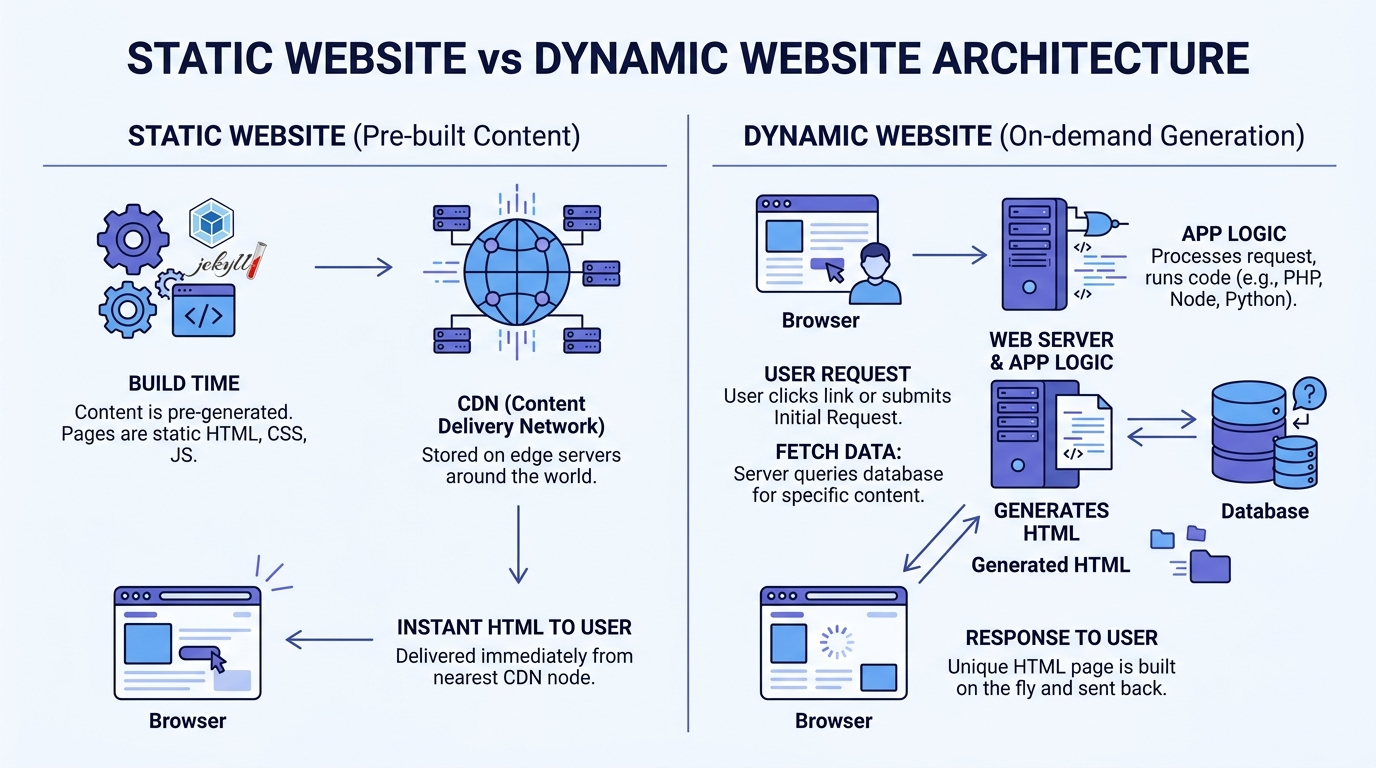
Static websites consist of pre-rendered HTML, CSS, and JavaScript files served directly from a CDN or simple static hosting. Every visitor receives the exact same files until the site is rebuilt and redeployed. Dynamic websites assemble pages on demand, typically pulling from a database, user session, APIs, or server-side logic for each individual request.
This distinction has major consequences for performance, hosting costs, security, development velocity, content workflows, and search engine rankings. In 2026, with Core Web Vitals influencing SEO and users abandoning slow experiences within seconds, choosing the wrong model can quietly damage both user satisfaction and business results.
The decision also sits at the center of broader web architecture strategy. Many projects end up over- or under-engineered simply because the static versus dynamic question was never asked explicitly at the start.
After more than 13 years building digital experiences, much of it spent on high performance sites for font foundries and typography-focused clients using Astro, one pattern keeps repeating: most websites are far more static in nature than their technology choices suggest. A static-first approach with selective dynamic enhancements has proven to be the sweet spot for the vast majority of content-driven projects.
How Static Generation and Dynamic Rendering Work in Practice
Static generation (SSG) builds every page into static HTML assets at deploy time. Frameworks optimized for this approach, such as Astro, Hugo, or Eleventy, produce sites that can be served instantly from edge caches worldwide. Dynamic rendering usually involves server-side rendering (SSR) on each request or client-side rendering (CSR) in the browser, often backed by a database or external services.
In theory, dynamic sites offer more power because they can deliver personalized, real time, or frequently changing content. In practice, a surprising amount of what gets built as fully dynamic can be achieved with static generation plus targeted enhancements: on-demand revalidation, edge functions, webhooks from a headless CMS, or small interactive components that only hydrate when needed.
Consider a typical font foundry or typography resource site. Specimen pages, blog posts, documentation, and marketing content change on a predictable schedule and are identical for nearly every visitor. These are ideal for static generation. A live pricing calculator, user dashboard, or collaborative editing interface clearly requires dynamic behavior. The art lies in accurately identifying which parts of the experience truly need to be dynamic versus which can be pre-rendered and served from a CDN edge node closest to the user.
Step by Step: Choosing and Implementing the Right Approach
A reliable process for making this decision looks like this:
1. Conduct a content and update-frequency audit. List every major page type and note how often the underlying content actually changes. Monthly marketing updates? Static is perfect. Live inventory, user comments, or real time notifications? Those are dynamic candidates.
2. Map real user journeys. Pinpoint the exact moments where personalization, authentication, or live data meaningfully improves the experience. Distinguish “nice to have” from “core to the value proposition.” This distinction alone eliminates a lot of unnecessary complexity.
3. Prototype or estimate the critical paths. For high impact flows, quickly validate the complexity and performance implications of both approaches before committing to infrastructure.
4. Default to static generation. Begin with a static or hybrid baseline. Introduce dynamic rendering, server components, or client-side logic only where it delivers measurable user or business value.
5. Measure, learn, and adjust. After launch, track actual Core Web Vitals, bounce rates, and content publishing velocity. Rebalance the static/dynamic split based on real data rather than assumptions.
The most frequent failure point is skipping the audit entirely and defaulting to whatever framework feels familiar or currently popular. This almost always produces more complexity and cost than the project requires. Teams assume they need a database and a server for “future flexibility,” and they end up paying for infrastructure that never earns its keep.
Advanced Techniques: Getting the Best of Both Worlds
Pure static versus pure dynamic is increasingly a false choice. The strongest modern implementations combine both intelligently, and the tooling has matured to the point where this is no longer a difficult architectural feat.
Use incremental static regeneration or on-demand revalidation so you keep static speed while allowing content to stay fresh without full rebuilds. Add lightweight edge middleware or serverless functions for personalization, A/B testing, or authentication checks without shipping a full dynamic backend. Apply the islands architecture (as popularized by Astro) to ship almost zero JavaScript by default and hydrate only the interactive pieces that actually need it. Partial prerendering and streaming handle complex pages well: the static shell loads instantly while dynamic sections stream in behind it.
Effective teams treat every dynamic layer as a cost, in latency, bundle size, infrastructure, and maintenance, and only accept that cost when it produces clear returns. Less disciplined projects add dynamism by default or “just in case,” paying the performance and operational tax without ever measuring whether the benefit justified it.
After years of working in this space, the recommendation is consistent: Astro is the right starting point for most new projects and many migrations. It excels at static generation while making it straightforward to add islands of interactivity or server-rendered sections only where needed. You get the benefits of both models without committing to heavy dynamic infrastructure upfront.
See how Astro makes hybrid rendering practical in our Astro vs Next.js vs Hugo comparison.
Real World Results from Actual Projects
When content-focused sites move from traditional dynamic platforms to well executed static or hybrid setups, the improvements are consistent and substantial.
Real performance data from multiple migrations tells the story clearly:
| Metric | Before (Dynamic) | After (Static) | Improvement |
|---|---|---|---|
| Largest Contentful Paint | 4.1s | 1.4s | -66% |
| Time to Interactive | 5.8s | 2.1s | -64% |
| Lighthouse Performance | 72 | 97 | +25 points |
Hosting costs fell significantly after moving to CDN-only delivery, eliminating the need for always-on application servers and the complex caching layers required to keep them tolerable.
One particularly instructive example involved a content-heavy resource site in the creative tools space. After switching to static generation, mobile Lighthouse performance scores moved solidly into the 95+ range. The editorial team also reported faster publishing cycles because updates could flow through a headless CMS with automatic or one click rebuilds rather than requiring backend deployments. Less waiting, fewer moving parts, happier editors.
The broader lesson is to stay pragmatic. If content velocity or feature requirements change significantly later, you can introduce additional dynamic capabilities on top of a strong static foundation. Going the other direction, trying to strip dynamism out of an over-engineered system, is far more painful.
Static vs Dynamic Websites: Head-to-Head Comparison
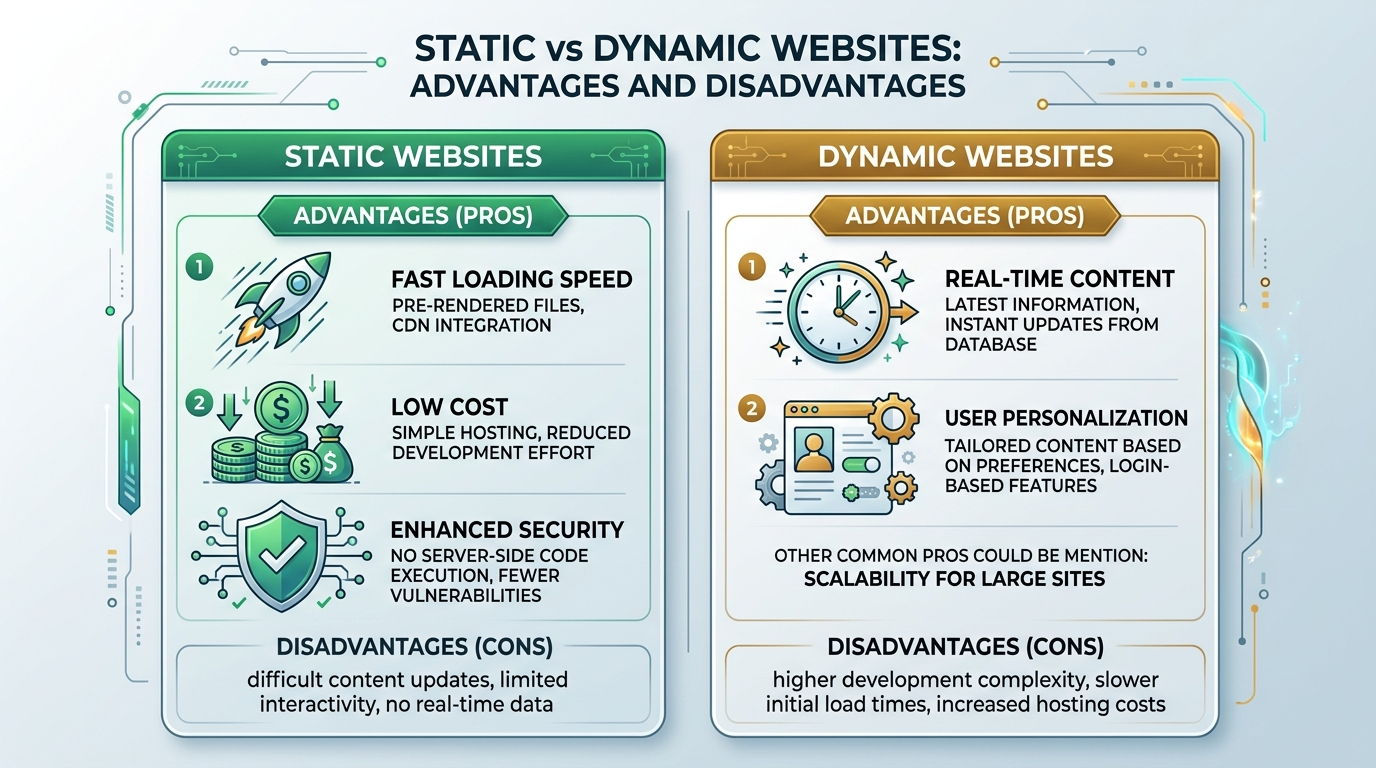
| Aspect | Static / SSG | Dynamic / SSR | Best Default |
|---|---|---|---|
| Performance | Excellent. Pre-rendered files served from CDN edge cache | Variable. Depends on server response and caching | Static |
| Hosting Cost | Very low. CDN only | Higher. Servers, databases, autoscaling, monitoring | Static |
| Security Surface | Minimal attack surface | Larger. APIs, databases, authentication layers | Static |
| Content Freshness | Excellent with ISR, webhooks, or scheduled rebuilds | Native real time capability | Depends |
| Personalization | Limited or handled at edge | Native and powerful | Dynamic |
| Dev Speed | Fast for content sites | Can slow down due to state, caching, and scaling | Static |
| SEO & Core Web Vitals | Excellent. Fast, fully crawlable | Good only if caching and streaming are well tuned | Static |
| Scalability | Near infinite and automatic via CDN | Requires deliberate architecture and monitoring | Static |
Treat the static column as your starting point. Only move specific features into the dynamic column when the comparison above shows a clear, validated justification for your particular traffic patterns, content update frequency, and user needs.
Common Mistakes When Choosing Between Static and Dynamic
Mistake 1: Defaulting to a dynamic stack because it feels “modern” or matches what popular frameworks promote.
This is the most damaging and most common mistake. Many teams adopt full SSR or app-router patterns without ever asking whether the majority of their content actually needs to be rendered per request. The result is unnecessary operational overhead and slower experiences for users who would have been better served by static files. Following framework popularity is not an architecture decision.
Mistake 2: Underestimating content operations and publishing velocity.
A fully dynamic admin interface looks impressive in a demo, but if most updates are infrequent, a static site backed by a headless CMS or a simple Git-based Markdown workflow is often faster, more reliable, and easier for non technical editors to use. The complexity of a dynamic backend doesn’t disappear after launch; someone has to maintain it.
Mistake 3: Accepting mediocre performance as inevitable.
Without measuring, it’s easy to rationalize “it’s fast enough” after adding layers of dynamism. The performance gap between a well built static site and a typical dynamic implementation is often large enough to affect bounce rates, conversions, and SEO rankings, especially on mobile networks where the latency of a server round-trip is felt immediately. That gap doesn’t shrink on its own.
Avoid these traps by starting with an honest content and requirements audit, then selecting the simplest architecture that genuinely meets those requirements rather than imagined future needs.