Astro vs Next.js vs Hugo: Which Static Site Generator Is Right for You?
A comparison of Astro, Next.js, and Hugo for static sites. Performance benchmarks, architecture differences, and how to choose the right SSG for your project.
What Are Astro, Next.js, and Hugo and Why Choosing the Right One Matters
Static site generators have become the foundation for high performance websites in 2026. Instead of generating HTML on every request like traditional servers or monolithic CMS platforms, an SSG builds your entire site into static files at build time. Those files get served instantly from any CDN with near zero latency.
The choice between Astro, Next.js, and Hugo isn’t about which tool is “best” in absolute terms. It’s about matching the tool to your project’s content volume, interactivity needs, team skills, and long-term maintenance reality.
Having spent several years building production websites across all three, I can tell you that this decision has real downstream consequences. I’ve built typography-focused sites and font foundry platforms with Astro where performance and clean content delivery are non-negotiable. I’ve used Hugo for large documentation and content-heavy projects where build speed at scale was critical. I’ve evaluated Next.js for client projects requiring more complex interactive features or React ecosystem integration. Each tool has a clear domain where it wins, and a domain where it costs you more than it gives.
The choice directly impacts:
- Core Web Vitals and user experience
- Build and deployment speed (especially important for frequent content updates)
- JavaScript payload size (critical for mobile performance and SEO)
- Developer velocity and hiring
- Hosting costs at scale
If you’re building a content-focused site (blog, marketing site, documentation, portfolio, or a design-focused site like a font foundry), the wrong choice can mean shipping unnecessary JavaScript, slower iteration cycles, or over-engineered infrastructure.
Core Concepts: How Each SSG Actually Works
Understanding the fundamental architecture explains why the performance and developer experience differences exist.
Hugo is a Go-based SSG built for speed and simplicity at massive scale, and it deserves genuine respect for what it does better than anything else in this space. It uses Go templates and processes Markdown (and other formats) extremely efficiently. There’s no JavaScript runtime or Node.js build step by default. Everything compiles into clean HTML, CSS, and optional hand-written JS. This makes it genuinely fast for sites with thousands of pages in a way that no Node-based tool can match. If your project is pure content at extreme scale, Hugo is still the undisputed king of build speed.
Astro takes a modern component-based approach but defaults to shipping zero JavaScript. Its “Islands Architecture” lets you write UI components in React, Svelte, Vue, Solid, or plain HTML/JS, then explicitly mark which ones need to hydrate on the client. The rest of the page is pure static HTML. Astro also includes excellent built-in Content Collections for type-safe Markdown/MDX content.
Next.js (when used for static sites) is a React framework first. Even in static export or static rendering mode, it includes the React runtime and usually more JavaScript unless you’re extremely disciplined with Server Components and bundle analysis. It shines when you need hybrid rendering (SSG + SSR + ISR) in the same project.
The core philosophical difference breaks down cleanly:
- Hugo = maximum speed and simplicity for pure content
- Astro = modern DX with selective interactivity for content sites
- Next.js = full stack React power (use static generation when it fits)
Implementation: Setting Up and Building with Each
Getting started reveals immediate differences in workflow, and those differences compound over the life of a project.
Hugo setup is the simplest if you like minimal tooling: download a single binary, create a few folders, and start writing Markdown. No npm install. Themes are powerful but can feel dated compared to component ecosystems. Content organization uses a clear file-based structure with excellent support for taxonomies and multilingual sites out of the box.
Astro feels familiar to modern frontend developers. You run npm create astro@latest, choose integrations (Tailwind, React, Svelte, MDX, etc.), and start building with .astro files or components from your preferred framework. Content Collections give you Zod-validated, type-safe content that feels like working with a headless CMS but lives in your repo. Image optimization and View Transitions are first class features, not afterthoughts.
Next.js setup is also straightforward with create-next app, but you’re immediately in React land. For pure static sites you can use output: 'export', but many teams end up using Vercel’s hybrid capabilities anyway. The App Router and React Server Components add powerful patterns, but they also introduce more decisions around data fetching and caching.
Common early friction points worth knowing before you commit:
- Hugo: Learning Go template syntax and the (excellent but different) way it handles partials and data. Frontend developers used to JSX find this genuinely disorienting at first.
- Astro: Understanding when to use
client:load,client:visible, orclient:onlydirectives for islands. The mental model clicks quickly, but it’s a new concept. - Next.js: Avoiding the temptation to make everything a Client Component and accidentally shipping large bundles. This is the most common performance mistake I see on Next.js content sites.
Advanced Techniques: Islands, Hybrid Rendering, and Scaling Content
Beyond the basics, each tool has distinct strengths in advanced scenarios, and this is where your long-term architectural decisions really matter.
Performance at scale becomes the differentiator fast. Hugo’s Go engine compiles enormous sites (10,000+ pages) in seconds. Astro handles large sites well with Content Collections and smart caching. Next.js build times grow more noticeably with complex React trees, and that growth is non linear once you’re past a few hundred pages.
Adding interactivity without bloat looks different in each tool. Astro’s Islands Architecture is purpose built for this. A contact form, modal, or font preview component can hydrate independently without loading React for the entire page. On the font foundry projects I’ve built with Astro, this was critical: interactive type testers load as isolated islands while the surrounding editorial content stays pure HTML. Hugo requires you to write vanilla JS or include libraries manually, which is fine for simple interactions but gets unwieldy for anything complex. Next.js makes adding interactivity trivial (it’s React), but the baseline cost is higher regardless of how much interactivity you actually use.
Content workflows also diverge meaningfully at scale. All three support Markdown/MDX well. Astro’s Content Collections with schema validation is currently the best developer experience for structured content. Hugo has native i18n and taxonomy features that are hard to beat for large multilingual or heavily categorized sites. Next.js relies more on external libraries or custom solutions for advanced content modeling, which adds surface area for maintenance.
Real World Performance and When Each Shines
In real world tests on similar marketing and documentation sites, properly configured Astro and Hugo sites routinely achieve sub-1s Largest Contentful Paint and near perfect Core Web Vitals with minimal effort. The key advantage comes from shipping little to no JavaScript by default. Next.js projects can match this but require deliberate effort to minimize the React bundle and leverage static rendering effectively. For high traffic content sites, the reduced JS payload in Astro and Hugo also translates to lower hosting costs and better scalability on static CDNs.
This isn’t theoretical. On content sites with 500 to 2,000 pages, Astro and Hugo consistently hit Lighthouse Performance scores of 98-100. Next.js content sites without heavy optimization typically land at 88-96. That gap matters for SEO and it matters for users on slower mobile connections.
When your site has mostly static content with occasional interactive elements (a filterable directory, a theme switcher, or embedded previews), Astro’s model prevents you from paying the React tax on every page view. You get component-based development without the runtime cost on pages that don’t need it.
Head-to-Head Comparison: Astro vs Next.js vs Hugo
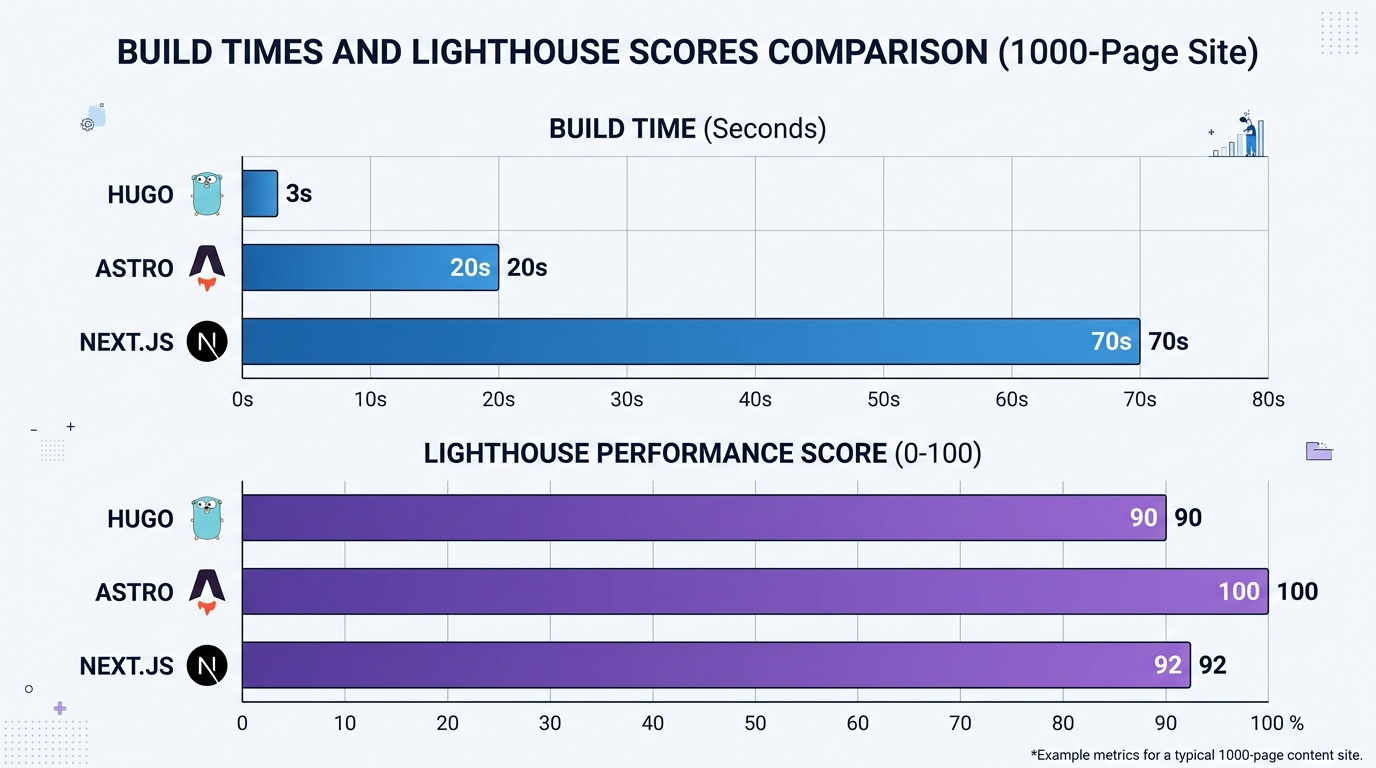
Based on benchmarks and production builds for content sites with 500-2,000 pages including optimized images. In recent client projects (marketing sites with 800 to 1,200 pages), the numbers held up consistently across Astro 5.x, Next.js 15.x, and Hugo 0.140+:
- Build time: Hugo ~2-5 seconds, Astro ~10-30 seconds, Next.js ~40-90 seconds.
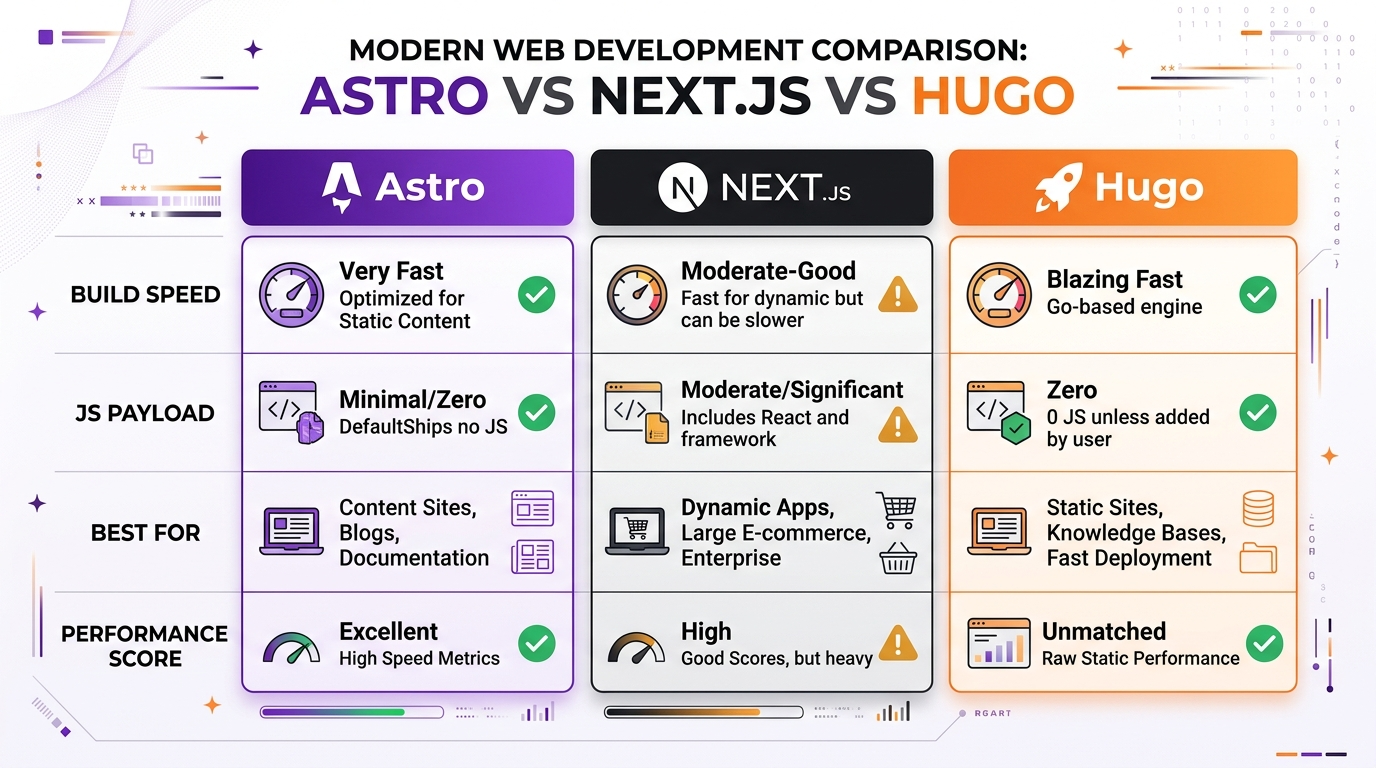
- Initial JS payload: Hugo and Astro near 0 KB (unless islands or components are added), Next.js typically 80-150 KB+ because of the React runtime even on static pages.
- Lighthouse Performance scores: Astro and Hugo consistently 98-100; Next.js content sites often 88-96 without heavy optimization.
All three produce excellent static HTML, but the JavaScript overhead and build pipeline differences become pronounced at scale or with frequent content updates.
Choose Hugo if (and it’s a strong choice for the right project):
- You have (or expect) thousands of pages
- Build and deploy speed is a daily concern
- You want zero Node.js dependency and maximum simplicity
- Your content is highly structured (taxonomies, multilingual, docs)
- Your team is comfortable with Go templates or willing to invest in learning them
Choose Astro if:
- You’re building a modern content site, blog, marketing site, portfolio, or documentation hub
- Performance and Core Web Vitals are top priorities
- You want component-based development without shipping a full framework to every visitor
- You value excellent Markdown/MDX support and type-safe content collections
- You might want to mix React, Svelte, and Vue components in one project
Choose Next.js if:
- Your project needs authentication, user accounts, or real time dynamic data
- You’re deeply invested in the React ecosystem and team skills
- You want one framework that can handle SSG, SSR, ISR, and API routes
- You’re building a hybrid marketing and application experience (SaaS landing pages plus a dashboard, for example)
For most content-driven websites, Astro is the right default choice. It delivers the best balance of developer experience, runtime performance, and flexibility. Hugo is the right call when raw build speed for very large content volumes is the constraint. Next.js earns its complexity when you genuinely need the hybrid rendering and React ecosystem depth.
Common Mistakes When Choosing a Static Site Generator
Even experienced teams make these errors, and some of them are expensive to undo.
1. Choosing Next.js “because everyone uses it” for a simple marketing or content site. This is the most common mistake I see. The result is larger bundles, slower builds, and more maintenance than the project requires. The React runtime is powerful but it’s never free.
2. Underestimating Hugo’s learning curve for teams that live in JavaScript. Hugo is fast, but the Go templating model and lack of a component ecosystem can genuinely slow down frontend developers used to React/Vue/Svelte patterns. The frustration is real and worth factoring into your timeline.
3. Over-engineering with Astro Islands. Not every piece of UI needs to be an interactive island. Many sites can stay almost entirely static and still feel modern. The Islands Architecture is a tool for surgical interactivity, not a reason to componentize everything.
4. Ignoring long-term content volume. A site that starts at 200 pages and grows to 5,000+ will feel very different in each tool. Hugo’s build time advantage becomes increasingly significant as content scales. Plan for where you’ll be in two years, not just where you are today.
5. Treating the SSG choice as permanent. Migration between these tools is very possible (especially migrating content to Astro or Hugo), but it costs real time. Make the decision thoughtfully upfront based on your actual requirements, not on what’s trending on social media this month.
Recommendation Matrix
A quick reference for the most common project types. Use this as a starting point, then validate against your specific requirements.
| Project Type | Best Tool | Why | When to Choose Alternative |
|---|---|---|---|
| Marketing site / Landing pages | Astro | Zero JS by default, fast builds, excellent Tailwind and component support | Hugo if the team has no JS experience at all |
| Blog / Content site | Astro | Content Collections, MDX support, type-safe frontmatter, image optimization | Hugo for 5,000+ pages or multilingual-first sites |
| Documentation hub | Astro | Starlight integration, excellent search, structured content workflows | Hugo for massive docs with complex taxonomies |
| Portfolio / Design studio site | Astro | Image optimization, View Transitions, full design control with components | Next.js if client portal or user accounts are needed |
| Large-scale content (5,000+ pages) | Hugo | Sub-second builds for thousands of pages, zero infrastructure overhead | Astro if interactivity or modern component DX is a priority |
| Multilingual / i18n-heavy site | Hugo | Native i18n and taxonomy features are unmatched for structured multilingual content | Astro with i18n integration for simpler multilingual needs |
| SaaS marketing + dashboard | Next.js | Hybrid rendering (SSG + SSR), authentication, API routes in one codebase | Astro for marketing pages + separate app for the dashboard |
| E-commerce with user accounts | Next.js | Dynamic pricing, cart state, user sessions, real-time inventory | Astro for catalog pages + edge functions for dynamic features |
The pattern is clear: Astro covers the majority of content-driven projects, Hugo wins at extreme scale and structured content, and Next.js earns its place when you genuinely need a full stack application framework.